


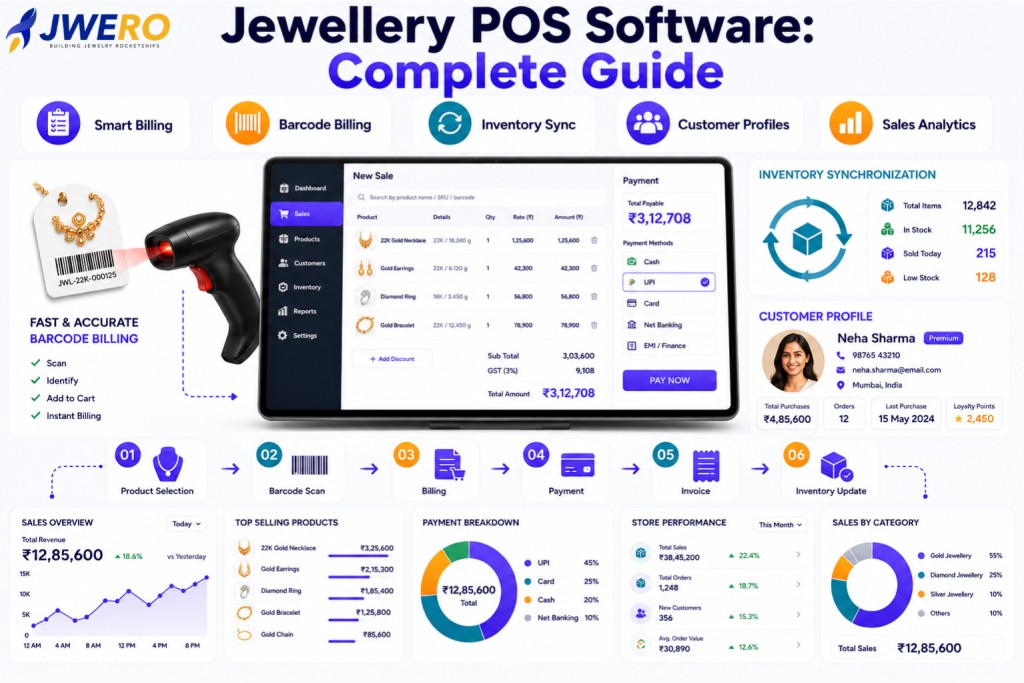
A Point of Sale (POS) system is one of the most important technologies inside a jewellery store.
Every sale, billing transaction, inventory update, and customer interaction passes through the POS.
Modern jewellery POS software goes far beyond billing.
It helps retailers manage:
- Sales
- Inventory
- Customers
- Payments
- Reporting
- Store Operations
This guide explains everything jewellers need to know about POS software.
What is Jewellery POS Software?
Jewellery POS software is a system used to process sales transactions while simultaneously updating inventory and business records.
A POS system acts as the operational centre of the showroom.
Why POS Software Matters
POS software helps retailers:
- Speed Up Billing
- Improve Accuracy
- Reduce Manual Work
- Improve Customer Experience
- Track Sales Performance
- Improve Inventory Visibility
POS directly impacts operational efficiency.
Core Functions of Jewellery POS Software
Billing Management
Support for:
- Product Billing
- GST Billing
- Discounts
- Multiple Payment Modes
- Invoice Generation
Billing should be fast and accurate.
Inventory Integration
Every sale should automatically update:
- Available Stock
- Product Status
- Inventory Value
- Store Inventory Reports
Real-time inventory updates prevent errors.
Barcode Billing
Barcode support enables:
- Faster Checkout
- Better Accuracy
- Product Lookup
- Inventory Synchronization
Barcode billing improves operational speed.
Customer Profile Management
Track:
- Customer Details
- Purchase History
- Preferences
- Loyalty Information
- Visit History
Customer visibility improves engagement.
The Jewellery POS Workflow
Product Selection
↓
Barcode Scan
↓
Billing
↓
Payment Collection
↓
Invoice Generation
↓
Inventory Update
↓
Customer Record Update
↓
Reporting
This workflow should happen automatically.
Key POS Features Every Jeweller Needs
- Fast Billing Interface
- Barcode Integration
- Inventory Sync
- Customer Profiles
- Multi-Payment Support
- GST Compliance
- Reporting Dashboard
- Multi-Store Support
A modern POS should connect operations seamlessly.
Multi-Store POS Management
Retailers with multiple locations require:
- Centralised Billing Visibility
- Store-Wise Reporting
- Inventory Synchronization
- Unified Customer Data
Multi-store control improves scalability.
POS Analytics Dashboard
Track:
- Daily Revenue
- Sales by Category
- Average Order Value
- Top-Selling Products
- Store Performance
- Staff Performance
Analytics improve decision-making.
POS + Inventory Integration
The best POS systems connect directly with inventory management.
Benefits:
- Real-Time Stock Updates
- Inventory Accuracy
- Faster Audits
- Better Reporting
- Improved Visibility
POS and inventory should operate together.
POS + CRM Integration
Modern jewellers benefit from POS systems connected with CRM.
Benefits:
- Customer Profiles
- Purchase History
- Follow-Ups
- Loyalty Programs
- Repeat Sales Campaigns
Customer visibility improves retention.
Common POS Software Mistakes
- Using Manual Billing
- No Barcode Integration
- No Inventory Sync
- Weak Reporting
- No Customer Tracking
- No CRM Integration
These issues limit growth.
POS KPIs to Track
- Revenue Per Day
- Average Order Value
- Billing Volume
- Product Sales Mix
- Customer Retention Rate
- Store Performance
KPIs reveal operational performance.
How Jwero Complements POS Software
While POS systems manage billing and transactions, Jwero helps retailers manage:
- Leads
- Appointments
- Customer Journeys
- Follow-Ups
- WhatsApp Engagement
- Repeat Sales Campaigns
- Customer Analytics
Together, they create a complete customer and operational ecosystem.
Final Thoughts
POS software is no longer just a billing tool.
It is the operational hub of the jewellery showroom.
By connecting:
- Billing
- Inventory
- Customer Data
- Reporting
- CRM
Retailers gain complete visibility and operational control.
Frequently Asked Questions
What is jewellery POS software?
A system that manages billing, inventory updates, customer data, and sales reporting is called Jewellery POS Software.
Why is barcode billing important?
Barcode billing is important because it improves speed, accuracy, and inventory synchronisation.
Should POS integrate with inventory?
Yes. Real-time inventory updates improve accuracy and reporting.
Should POS integrate with CRM?
Yes. CRM integration improves customer visibility, loyalty, and repeat sales.
What reports should a POS provide?
POS should provide reports like Revenue, product sales, inventory movement, staff performance, and customer analytics.