


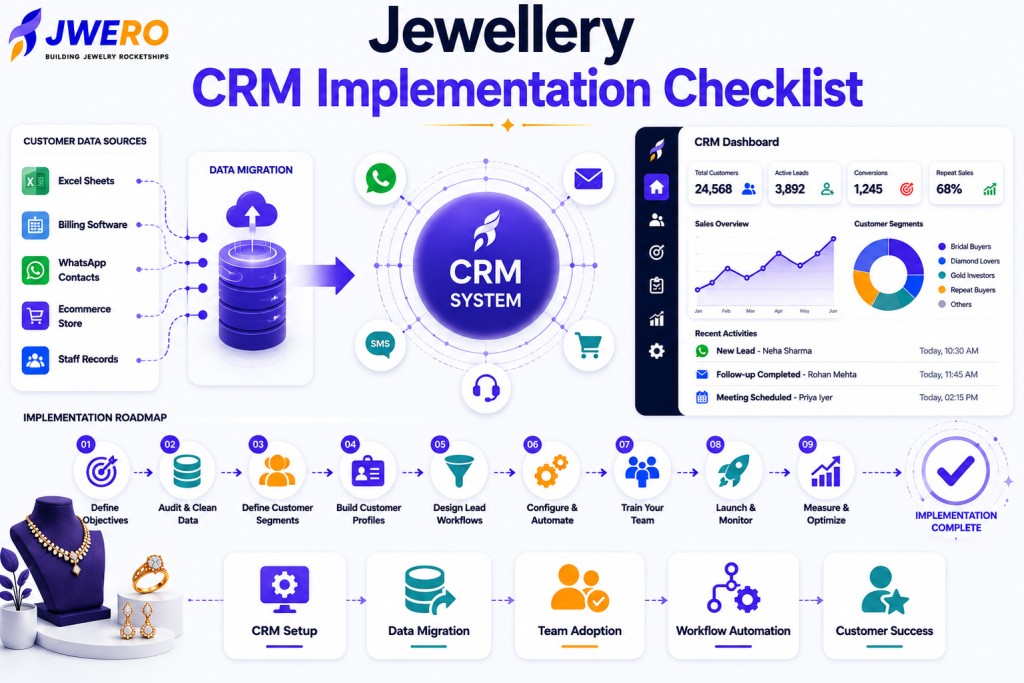
Many jewellery retailers invest in CRM software, expecting immediate results.
The reality is different.
A CRM does not improve customer relationships simply because it has been purchased.
The value comes from implementation.
A well-implemented CRM creates visibility, consistency, personalisation, and growth.
A poorly implemented CRM becomes another unused software tool.
This guide provides a practical implementation checklist to help jewellery businesses deploy CRM successfully.
Why CRM Implementation Matters
A CRM becomes the foundation for:
- Customer engagement
- Lead management
- Follow-ups
- Customer intelligence
- Loyalty programs
- Repeat sales
Implementation determines whether the system becomes a growth platform or a reporting tool.
Phase 1: Define Business Objectives
Before selecting workflows or importing data, define success.
Ask:
What problems are we solving?
Examples:
- Missed follow-ups
- Customer data fragmentation
- Low repeat sales
- Poor visibility
What outcomes do we want?
Examples:
- Better customer engagement
- Higher conversions
- Improved retention
- Better customer intelligence
Clear objectives improve implementation decisions.
Phase 2: Audit Existing Customer Data
Most jewellery businesses already have customer information.
Common sources include:
- Excel sheets
- Billing software
- WhatsApp contacts
- Ecommerce systems
- Staff records
Create a complete inventory of available data.
Phase 3: Clean Customer Data
Poor data creates poor CRM outcomes.
Before migration:
- Remove Duplicates
- Correct Errors
- Standardize Formats
- Update Missing Information
Data quality should be prioritised from the beginning.
Phase 4: Define Customer Segments
Determine how customers should be grouped.
Examples:
- Bridal Buyers
- Diamond Customers
- Gold Investors
- Repeat Buyers
- High-Value Customers
Segmentation becomes easier when planned early.
Phase 5: Design Lead Management Workflows
Define how enquiries move through the business.
Example stages:
New Lead → Qualified → Engaged → Proposal → Converted
Every team member should follow the same process.
Phase 6: Build Customer Profiles
Determine which information should be captured.
Examples:
- Contact information
- Purchase history
- Preferences
- Important dates
- Communication history
Customer profiles should support personalisation.
Phase 7: Configure Follow-Up Processes
Follow-up consistency is one of CRM’s biggest benefits.
Create workflows for:
- New enquiries
- Product enquiries
- Appointment scheduling
- Post-purchase engagement
Automation can support consistency.
Phase 8: Connect Communication Channels
A CRM becomes more powerful when connected to:
- SMS
- Ecommerce
- Customer Service
Integration improves visibility.
Phase 9: Define Team Roles
Everyone should understand their responsibilities.
Examples:
Sales Team
Lead management.
Marketing Team
Customer engagement.
Store Staff
Customer relationship management.
Management
Reporting and oversight.
Clear ownership improves adoption.
Phase 10: Train the Team
Technology adoption depends on people.
Training should include:
- CRM navigation
- Data entry standards
- Follow-up workflows
- Customer profile management
Consistency matters more than complexity.
Phase 11: Launch in Phases
Avoid launching everything simultaneously.
Recommended approach:
Phase 1
Customer database.
Phase 2
Lead management.
Phase 3
Follow-ups.
Phase 4
Segmentation and engagement.
This reduces risk.
Phase 12: Monitor Adoption
Early adoption metrics are critical.
Track:
- Login frequency
- Data completeness
- Follow-up completion
- Workflow usage
Usage often predicts success.
Phase 13: Measure Business Impact
Key metrics include:
- Lead Conversion Rate
- Customer Retention
- Repeat Sales
- Follow-Up Completion
- Customer Engagement
CRM success should be measured through outcomes.
Common CRM Implementation Mistakes
Migrating Poor Data
Bad data creates long-term issues.
Overcomplicating Workflows
Simple processes often perform best.
Skipping Team Training
Adoption suffers.
Ignoring Customer Segmentation
Personalisation becomes difficult.
Treating CRM as an IT Project
CRM is a business transformation initiative.
CRM Implementation Checklist
Before Launch
✅ Define goals
✅ Audit customer data
✅ Clean customer records
✅ Define customer segments
✅ Build customer profiles
✅ Design lead workflows
During Launch
✅ Connect communication channels
✅ Train teams
✅ Test workflows
✅ Verify reporting
After Launch
✅ Monitor adoption
✅ Review customer engagement
✅ Measure conversions
✅ Improve workflows
✅ Expand automation
The Future of Jewellery CRM Implementation
Future CRM implementations will increasingly include:
- Artificial Intelligence
- Customer intelligence
- Predictive engagement
- Automated segmentation
- Customer journey orchestration
The foundation, however, remains strong in implementation.
How Jwero Supports CRM Implementation
Jwero helps jewellery retailers implement:
- Customer profiles
- Lead management
- WhatsApp engagement
- Customer segmentation
- Follow-up workflows
- Customer intelligence
This helps businesses create a connected customer engagement ecosystem.
Final Thoughts
A CRM is only as valuable as its implementation.
Businesses that invest time in planning, data quality, team adoption, and customer engagement workflows achieve significantly better results.
Implementation is not a technical exercise.
It is the process of building a stronger customer relationship system.
Frequently Asked Questions
How long does CRM implementation take?
Implementation timelines vary, but most jewellery retailers can begin seeing value within a few weeks when implementation is structured properly.
What is the most important part of CRM implementation?
Data quality and team adoption are typically the most important success factors.
Should customer data be cleaned before migration?
Yes. Cleaning customer records improves accuracy and long-term CRM performance.
Can small jewellery businesses implement CRM?
Absolutely. CRM implementation can be scaled based on business size and complexity.
Why do CRM projects fail?
Common reasons include poor data, lack of adoption, unclear objectives, and overly complex workflows.
Does CRM implementation improve sales?
When implemented correctly, CRM can improve lead management, customer engagement, and repeat sales performance.