


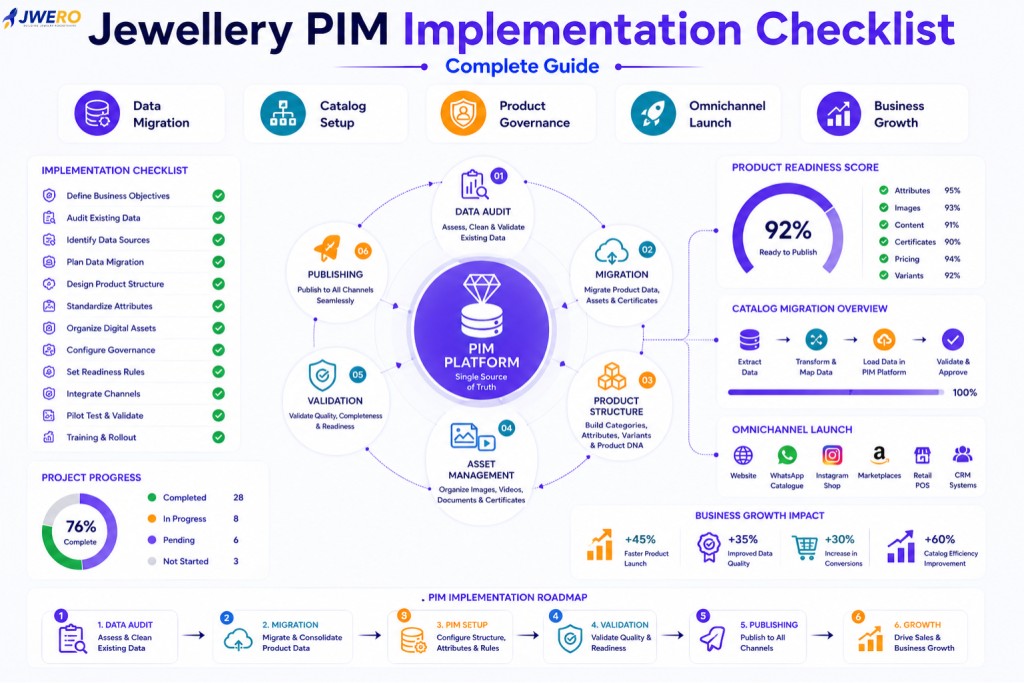
Implementing a Product Information Management (PIM) platform is one of the most important digital transformation projects a jewellery business can undertake.
A successful implementation creates a foundation for:
- Better Product Data
- Faster Product Launches
- Omnichannel Commerce
- AI Readiness
- Better Customer Experiences
- Business Scalability
However, many PIM projects fail because businesses focus on software selection but neglect implementation planning.
The reality is simple:
A great PIM implementation is not a software project.
It is a product data transformation project.
This guide provides a practical Jewellery PIM Implementation Checklist for retailers, wholesalers, manufacturers, and D2C jewellery brands.
Why Jewellery Businesses Need a Structured PIM Implementation Plan
Many businesses currently manage products across:
- ERP
- Ecommerce
- POS
- Marketplaces
- Excel Sheets
- Shared Drives
- Marketing Systems
Over time, product information becomes fragmented.
Common challenges include:
- Duplicate Products
- Missing Attributes
- Inconsistent Images
- Broken Product Relationships
- Missing Certificates
- Publishing Delays
A structured implementation eliminates these problems.
What Is a Jewellery PIM Implementation?
A jewellery PIM implementation involves:
- Product Data Consolidation
- Catalog Standardization
- Product Attribute Design
- Product Migration
- Asset Migration
- Governance Setup
- User Training
- Omnichannel Publishing Configuration
The goal is to create a single source of truth.
Phase 1: Define Business Objectives
Before implementing any PIM platform, define success criteria.
Questions to answer:
- Why Are We Implementing a PIM?
- What Problems Are We Solving?
- Which Teams Will Use It?
- Which Channels Will Connect?
- What Does Success Look Like?
Examples:
- Reduce catalogue errors
- Improve product readiness
- Support omnichannel commerce
- Accelerate product launches
Clear objectives improve implementation outcomes.
Phase 2: Audit Existing Product Data
Most jewellery businesses underestimate data quality issues.
Audit:
- Product Records
- Product Attributes
- Product Variants
- Product Images
- Product Videos
- Product Certificates
- Product Categories
- Product Collections
- Product Content
Document current data quality.
Phase 3: Identify Data Sources
Create a complete inventory of data sources.
Common sources include:
- ERP
- Ecommerce Platform
- POS
- Excel Files
- Google Sheets
- Shared Drives
- CRM
- Marketplace Portals
- Supplier Catalogs
Knowing where data exists is critical.
Phase 4: Create a Product Data Migration Plan
One of the most important steps is jewellery product data migration.
Determine:
- What Data Will Be Migrated
- What Data Will Be Archived
- What Data Requires Cleanup
- What Data Requires Enrichment
Migration should never be a direct copy-and-paste exercise.
Phase 5: Design Product Data Structure
Create a future-ready product model.
Define:
- Product Categories
- Product Families
- Product Collections
- Product DNA
- Product Variants
- Product Relationships
This becomes the foundation of the new catalogue.
Phase 6: Standardise Product Attributes
Attribute management is one of the most critical implementation activities.
Define standards for:
- Metal Type
- Purity
- Weight
- Stone Information
- Diamond Specifications
- Certifications
- Product Dimensions
- Product Tags
Standardisation improves long-term quality.
Phase 7: Build SKU and Product DNA Frameworks
A scalable catalogue requires:
- Product DNA
- Parent Products
- Variant Products
- SKU Structures
- Naming Conventions
Without this framework, catalogue complexity increases over time.
Phase 8: Prepare Digital Assets
Digital assets often create migration challenges.
Audit:
- Product Images
- Videos
- Certificates
- Marketing Assets
- PDFs
- Product Documents
Ensure every asset can be linked to the correct product.
Phase 9: Clean Product Content
Before migration, review:
- Product Titles
- Product Descriptions
- Product Tags
- SEO Metadata
- Product Highlights
Poor content should not be migrated unchanged.
Phase 10: Configure Product Governance
Governance ensures long-term success.
Define:
- User Roles
- Permissions
- Approval Workflows
- Data Ownership
- Validation Rules
- Quality Standards
Governance prevents catalogue deterioration.
Phase 11: Define Product Readiness Rules
Every product should meet readiness standards before publication.
Define required fields such as:
- Images
- Attributes
- Certificates
- Product Content
- Pricing
- Variants
- SEO Metadata
This creates measurable quality control.
Phase 12: Configure Omnichannel Publishing
Determine where products will be distributed.
Examples:
- Website
- Ecommerce
- Marketplace
- POS
- CRM
Publishing requirements should be documented before launch.
Phase 13: Plan Integrations
Most jewellery businesses require integrations.
Typical integrations include:
- ERP
- CRM
- Ecommerce
- POS
- Marketing Platforms
- Analytics Tools
- Marketplace Connectors
Integration planning should occur early.
Phase 14: Conduct Data Validation
Before go-live, validate:
- Product Attributes
- Product Variants
- Product Images
- Product Certificates
- Product Relationships
- Product Content
- Product Categories
Validation reduces post-launch issues.
Phase 15: Run Pilot Testing
Start with a pilot catalogue.
Examples:
- One Collection
- One Category
- One Product Family
- One Sales Channel
Testing helps identify issues before full rollout.
Phase 16: Train Teams
User adoption determines success.
Train:
- Product Teams
- Ecommerce Teams
- Marketing Teams
- Merchandising Teams
- Operations Teams
- Retail Teams
Training improves long-term ROI.
Phase 17: Launch in Phases
Avoid migrating everything at once.
Recommended approach:
- Phase 1 – Core Catalogue
- Phase 2 – Assets
- Phase 3 – Ecommerce
- Phase 4 – Omnichannel Publishing
- Phase 5 – AI Enrichment
A phased rollout reduces risk.
Phase 18: Measure Success
After launch, track:
- Product Completeness
- Product Readiness
- Publishing Speed
- Catalog Quality
- Data Accuracy
- Omnichannel Consistency
- Team Productivity
Metrics help justify investment.
Common Jewellery PIM Implementation Mistakes
Many businesses make avoidable mistakes:
- Migrating Dirty Data
- Ignoring Attribute Standards
- Skipping Governance
- Poor User Training
- Lack of Product Ownership
- No Readiness Framework
- No Data Validation
Avoiding these mistakes improves implementation success.
Jewellery PIM Implementation Checklist
- Define Business Objectives
- Audit Existing Data
- Identify Data Sources
- Plan Data Migration
- Design Product Structure
- Standardize Attributes
- Build Product DNA Framework
- Organise Digital Assets
- Clean Product Content
- Configure Governance
- Define Readiness Rules
- Configure Publishing Channels
- Plan Integrations
- Validate Data
- Pilot Test
- Train Teams
- Launch in Phases
- Measure Success
Why Jwero Simplifies PIM Implementation
Jwero helps jewellery businesses:
- Centralise Product Data
- Manage Product Attributes
- Migrate Catalogs
- Organise Digital Assets
- Manage Product DNA
- Improve Product Readiness
- Enable Omnichannel Publishing
- Support AI Enrichment
- Improve Governance
This accelerates implementation and reduces risk.
Final Thoughts
A successful Jewellery PIM implementation is not just about software.
It is about building the foundation for:
- Better Product Data
- Better Customer Experiences
- Better Catalogue Quality
- Better Omnichannel Commerce
- Better Business Growth
Businesses that follow a structured implementation plan will see faster adoption, better ROI, and long-term scalability.
FAQs
What is jewellery PIM implementation?
Jewellery PIM implementation is the process of deploying a Product Information Management platform and migrating product information into a centralised system.
How long does a PIM implementation take?
Implementation timelines vary based on catalogue size, data quality, integrations, and business requirements.
What is jewellery product data migration?
It is the process of moving product information, attributes, images, certificates, and content into a new PIM platform.
Why is catalogue migration important?
A well-planned catalogue migration improves data quality, consistency, and publishing efficiency.
What is the biggest risk during implementation?
The biggest risk is migrating poor-quality product data without proper validation and governance.